Docker is a containerization platform. It enables developers to package applications into containers—standardized executable components that combine application source code with all the operating system (OS) libraries and dependencies required to run the code in any environment.

This is a quick deployment and ready-to-run image.
Simple and rapid installation. Easy to maintain.
Connecting and configuring Docker Community Edition on Ubuntu 20.04 LTS
After purchasing and starting the VM, you should know its IP address. You can find it in the personal account of Amazon.
To connect to the Server, you should generate a “Private Key” in advance. This can be done using the following instruction (by choosing the “file format:” option “.ppk” in point 3) Guide – How To – Create and use Key Pair to connect to a VM
- Go to section SSH on the left panel, and then to Auth
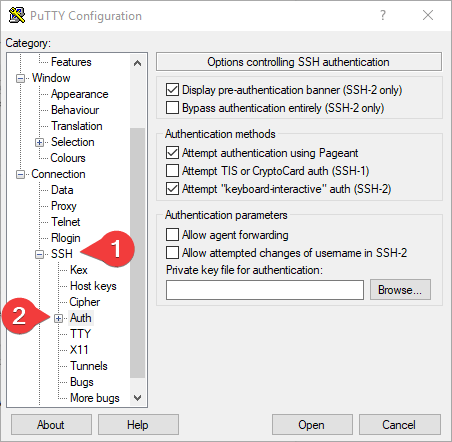
- In the “Auth” section, click “Browse” and specify the path to the .ppk file you received earlier.
- Go to the home page of “Session”, enter the IP address of the VM, and click “Open”.
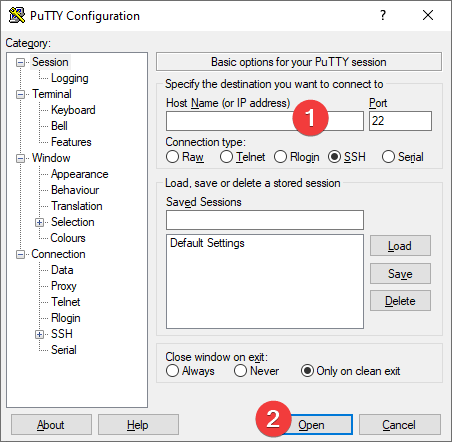
- In the opened console you will need to enter the login ubuntu and press Enter.

- To check that Docker is up and running, enter the command:
sudo docker run hello-world

- In order to confirm the installation of Docker Compose, you need to run the command: sudo apt info policykit-1

For further interaction, please refer to the main documentation:
If you have any questions, welcome to our community:
Official website:Docker
 Tidal Media Inc. — Software for Windows & Cloud Solutions