Azure CLI on Windows Server 2016 Datacenter provides a reliable scripting environment for Azure automation and deployment tasks on a widely adopted Windows Server platform.

This is a quick deployment and ready-to-run image.
Simple and rapid installation. Easy to maintain.
Connection to Azure CLI on Windows Server 2016 Datacenter
To connect to the Server, you should generate a “Private Key” in advance. This can be done using Guide – How To – Create and use Key Pair to connect to a VM
- To connect to the virtual machine click the Remote desktop file from step 10 of the “Guidance on usage”

- In the window that appears, enter the password from step 12 of the “Guidance on usage” and click “OK”

- Check the box and click “Yes.”

- Run the Command Prompt shortcut on the desktop

- To check the currently installed version and available updates, use the command
az -v:
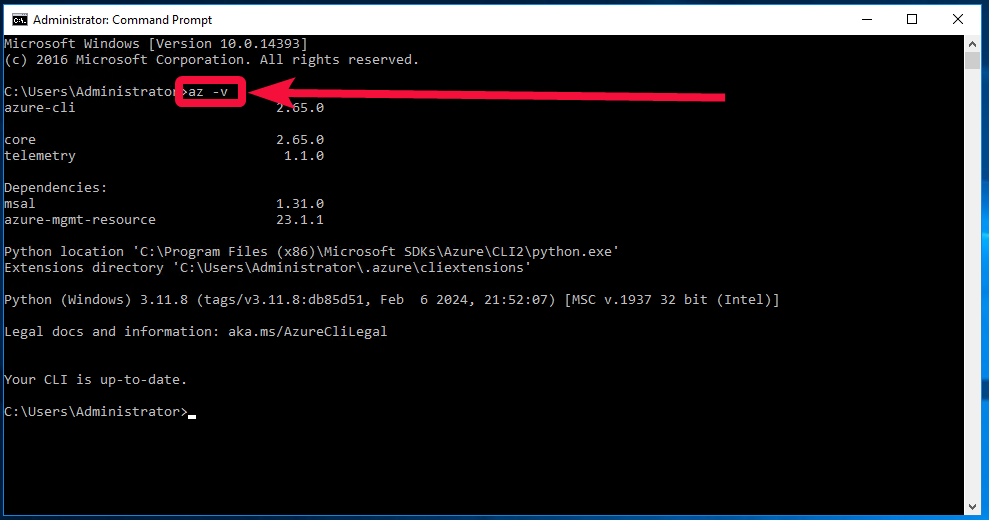
- To display a complete list of commands, type
az -h:

- To get more information use What is the Azure CLI? | Microsoft Learn
Now you can work with Azure Command Line Interface.
 Tidal Media Inc. — Software for Windows & Cloud Solutions